# By default, python executes code in order
print("This Statement Comes First")
print("This Statement Comes Second")
print("This Statement is Last")
This Statement Comes First
This Statement Comes Second
This Statement is LastIn computer science, control flow (or flow of control) is the order in which individual statements, instructions or function calls of an imperative program are executed or evaluated. The emphasis on explicit control flow distinguishes an imperative programming language from a declarative programming language.
Within an imperative programming language, a control flow statement is a statement that results in a choice being made as to which of two or more paths to follow. For non-strict functional languages, functions and language constructs exist to achieve the same result, but they are usually not termed control flow statements.
A set of statements is in turn generally structured as a block, which in addition to grouping, also defines a lexical scope.
Interrupts and signals are low-level mechanisms that can alter the flow of control in a way similar to a subroutine, but usually occur as a response to some external stimulus or event (that can occur asynchronously), rather than execution of an in-line control flow statement.
https://en.wikipedia.org/wiki/Control_flow
Virtually any computing problem can be solved by executing a series of actions in a specific order. An algorithm is a procedure for solving a problem in terms of: * the actions to execute * the order in which these actions execute
Specifying the order in which statements (actions) execute in a program is called program control. Pseudocodeis an informal language that helps you develop algorithms without having to worry about the strict details of Python syntax. This can be accomplished by writing out the steps of the algorithm in everyday English. These steps will describe the actions that occur within the algorithm and can be later converted into a Pythonic syntax. The overall goal of creating pseudocode is to plan out the steps of the algorithm. An example of pseudocode is shown below.
\[ \]
Goal: Create a program that displays Passed if the student’s grade is greater than or equal to 60.
If student’s grade is greater than or equal to 60
Display ‘Passed’
Usually, statements in a program execute in the order in which they’re written. This is called sequential execution.
Various Python statements enable you to specify what statement the Python interpreter should execute next, even if that statement doesn’t immediately follow the previously executed statement. This is called transfer of control and is achieved with Python control statements.
All programs can be written using three forms of control * Sequential execution * The selection statement * The iteration statement.
As shown below Python statements execute one after the other sequentially, unless directed otherwise.
# By default, python executes code in order
print("This Statement Comes First")
print("This Statement Comes Second")
print("This Statement is Last")This Statement Comes First
This Statement Comes Second
This Statement is LastFlow charts can be used as a graphical representation of an algorithm or a subsection of an algorithm. These can be drawn using rectangles, diamonds, rounded rectangles and small circles and are all connected by arrows called flowlines. This shows a clear picture on how forms of control operate.
This Flowchart segment shows the default Python sequential execution: 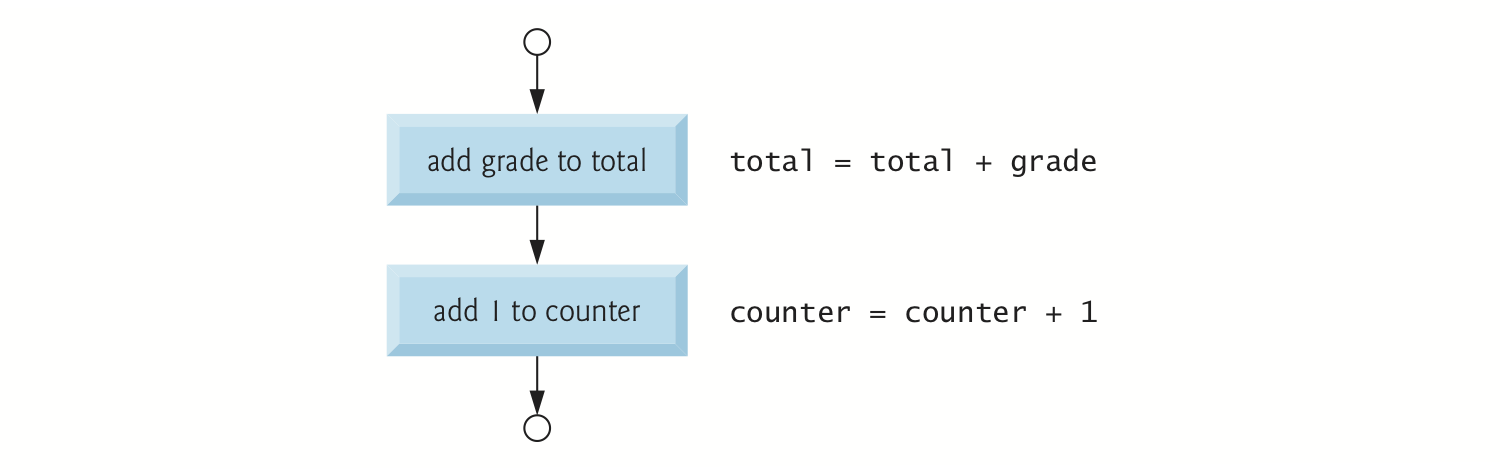
There are three selection statements that execute code based on a conditional expression that evaluates to either True or False: * if statements perform an action if a condition is True and skips the action if the condition is False.
if…else statements perform an action if a condition is True and performs a different action if the condition is False.
if…elif…else statements perform one of many different actions, depending on the truth or falsity of several conditions.
Anywhere a single action can be placed, a series of actions can be placed.
There are two iteration statements that can execute the same action or a series of actions multiple times;
while statements repeat an action or a series of actions for as long as a condition remains True.
for statements repeat an action or a series of actions for every item in a sequence of items.
Selection and Iteration statements are a subset of Pythonic keywords that cannot be altered or manipulated. They are used to perform more abstract actions within Python. The table below shows many of the commonly-used keywords. Notice that a few (shown in bold) start with an uppercase letter.
and |
as |
assert |
async |
await |
break |
class |
continue |
def |
del |
elif |
else |
except |
False |
finally |
for |
from |
global |
if |
import |
in |
is |
lambda |
None |
nonlocal |
not |
or |
pass |
raise |
return |
True |
try |
while |
with |
yield |
if Statement First, let’s look at a pseudocode example of an if statement.
Goal: Create a program that displays Passed if the student’s grade is greater than or equal to 60. > If student’s grade is greater than or equal to 60
> Display ‘Passed’
The condition in this case is whether the student’s grade is greater than or equal to 60. * If the condition is true, Passed is displayed. * If the condition is false, nothing is displayed.
The indentation in the pseudocode emphasizes that Passed is displayed only if the condition is true.
Following the pseudocode, this is the corresponding if Statement in Python
grade = 85if grade >= 60: # If student’s grade is greater than or equal to 60
print('Passed') # Display 'Passed'PassedPython uses suites or blocks to signify a subalgorithm within a control statement. These suites must be indented. It does not matter if the indentation is a space or a tab, but an error will arise if the suite is not properly indented.
if grade >= 60:
print('Passed')  # statement is not indented properly
File "<ipython-input-4-eb5359d7857b>", line 2 print('Passed') # statement is not indented properly ^ IndentationError: expected an indented block
Although a single space is allowed to indent a suite, most IDE’s will color-code the statement or raise a warning. This code does not raise an error but the standard indentation of suites in Python is a tab.
if grade >= 60:
print('Passed') # Uses just a space to indent.PassedIt is also required that multiple statements in a suite must have the same indentation.
if grade >= 60:
    print('Passed') # all statements in the suite do not have the same indentation
  print('Good job!)
File "<tokenize>", line 3 print('Good job!) ^ IndentationError: unindent does not match any outer indentation level
if Statement Flowchart The following flowchart illustrates the algorithm and pseudocode that were just used.

True or False.True.False.True or False if 1:
print('Nonzero values are true, so this will print\n')
if "Hello World":
print('Non-Empty strings are also true, so this will print')Nonzero values are true, so this will print
Non-Empty strings are also true, so this will printif 0:
print('Zero is false, so this will not print')
if '':
print('Empty stings are also false, so this will not print')== and = Using == instead of = in an assignment statement can lead to subtle problems.
Writing grade == 85 when we intend to define a variable with grade = 85 would cause a NameError.
Logical Errors: These occur when the code runs without an error, but the desired outcome is not as expected. These are less common than runtime errors but can be more of a headache to debug
if…else and if…elif…else Statements These statements will execute different sets of suites, based on whether a condition is True or False. Let’s look at anotherpseudocode example.
\[ \]
Goal: Create a program that displays Passed if the student’s grade is greater than or equal to 60. Otherwise, the program displays Failed.
If student’s grade is greater than or equal to 60
Display ‘Passed’
Otherwise
Display ‘Failed’
The condition in this case is whether the student’s grade is greater than or equal to 60. * If the condition is true, Passed is displayed. * If the condition is false, Failed is displayed.
# initialized grade to be 85
grade = 85
if grade >= 60:
print('Passed')
else:
print('Failed')Passed# initialize grade to be 57
grade = 57if grade >= 60:
print('Passed')
else:
print('Failed')Failedif…else Statement Flowchart The following flowchart illustrates the algorithm and pseudocode that that have been used.
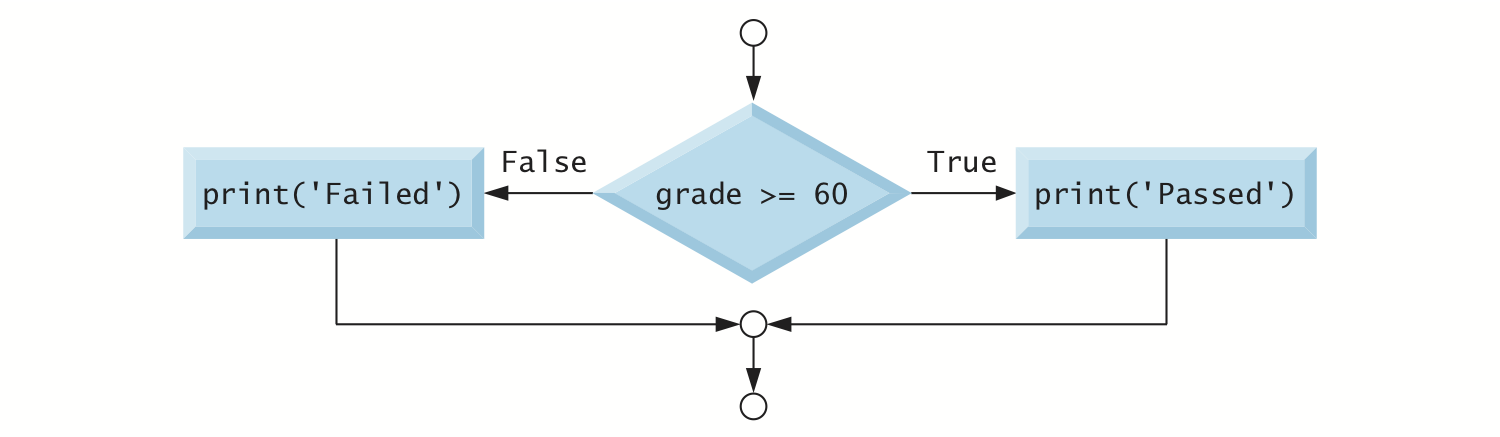
suites in an if…else statement assign different values to a variable, based on a condition# initialize grade to be 87
grade = 87if grade >= 60:
result = 'Passed' # if the grade is greater than or equal to 60, 'Passed' gets assigned to result
else:
result = 'Failed' # Otherwise, 'Failed' gets assigned to resultprint(result)PassedYou can also utilize multiple statements in a suite. However, be sure that every statement in the suite has the same indentation.
# initialize grade to be 49
grade = 49
if grade >= 60:
print('Passed')
else:
print('Failed')
print('You must take this course again')Failed
You must take this course againIf you do not indent the a statement in a suite, then it is not interpreted as being in the suite. In that case, the statement always executes, creating a logical error.
# initialize grade to be 100
grade = 100
if grade >= 60:
print('Passed')
else:
print('Failed')
print('You must take this course again') # This statement is not in the `else` suite, so it is always printedPassed
You must take this course againif…elif…else Statement elif is a shorthand keyword for else if. These statement can be used to test for many conditions. The only suite that gets executed in these statements is the first conditional expression that evaluates to True.
# initialize grade to be 77
grade = 77
if grade >= 90: # grade is not greater than 90, pass
print('A')
elif grade >= 80: # grade is not greater than 80, pass
print('B')
elif grade >= 70: # grade is greater than 70
print('C') # execute this suite, then exit the conditional statement
elif grade >= 60:
print('D')
else:
print('F')Cif…elif…else Statement Flowchart 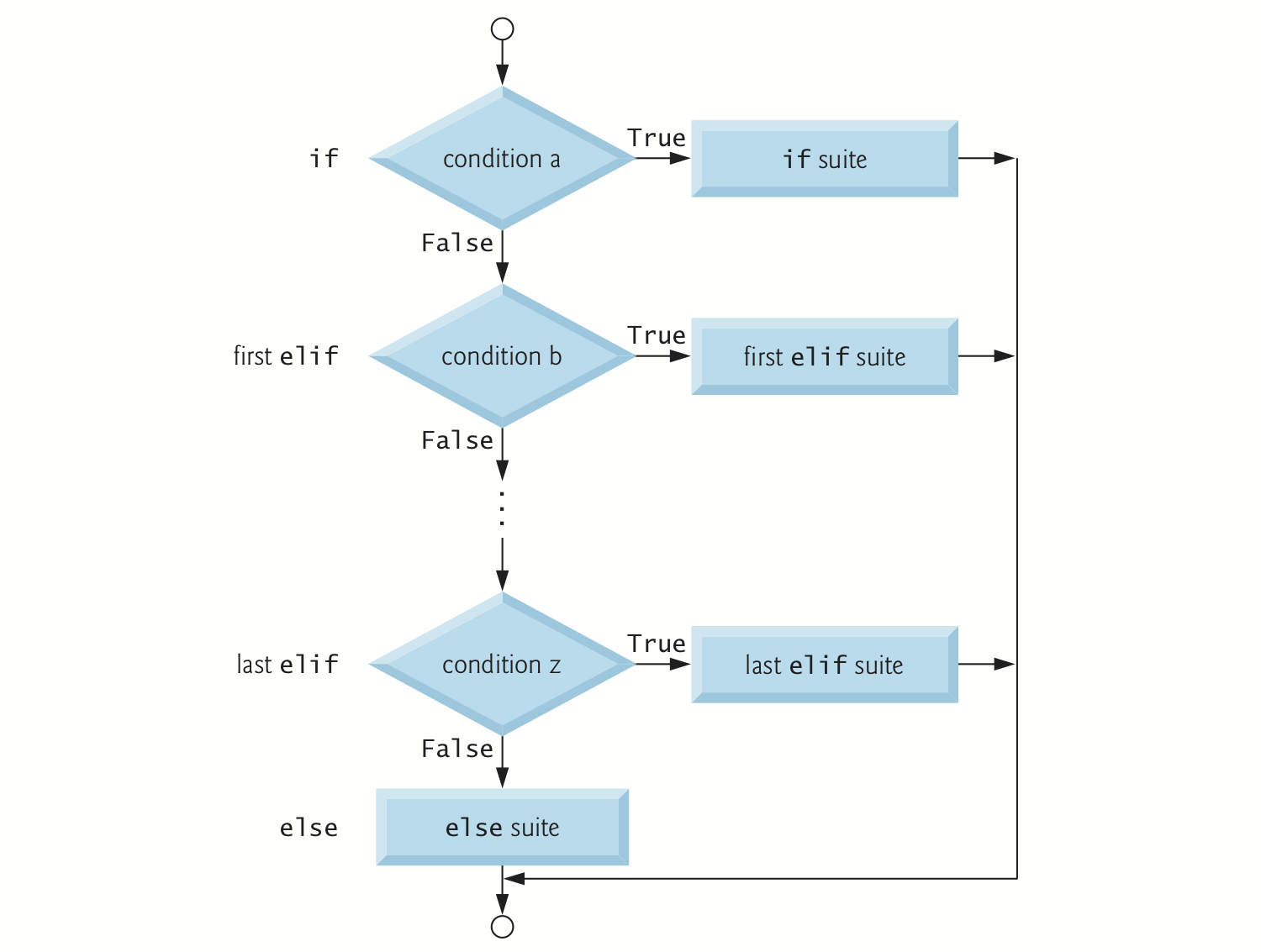
elif…else statement’s flow of control.else Is Optional The else keyword is intened to handle values that do not satisfy any of the conditions in a control statement. If an else is not included and no conditions are True, the program does not execute any of the statement’s suites
while Statement While statements will repeatedly execute a suite while a condition remains True.
# assign 3 to product
product = 3
while product <= 50: # if product is less than or equal to 50, execute suite.
print(product) # print the product
product = product * 3 # multiply the product by three, reassign, then return to the while statement3
9
27As soon as the conditional expression evaluates to False, the execution of the suites end. We can see here that the product is now greater than or equal to \(50\).
print(product)81while Statement Flowchart 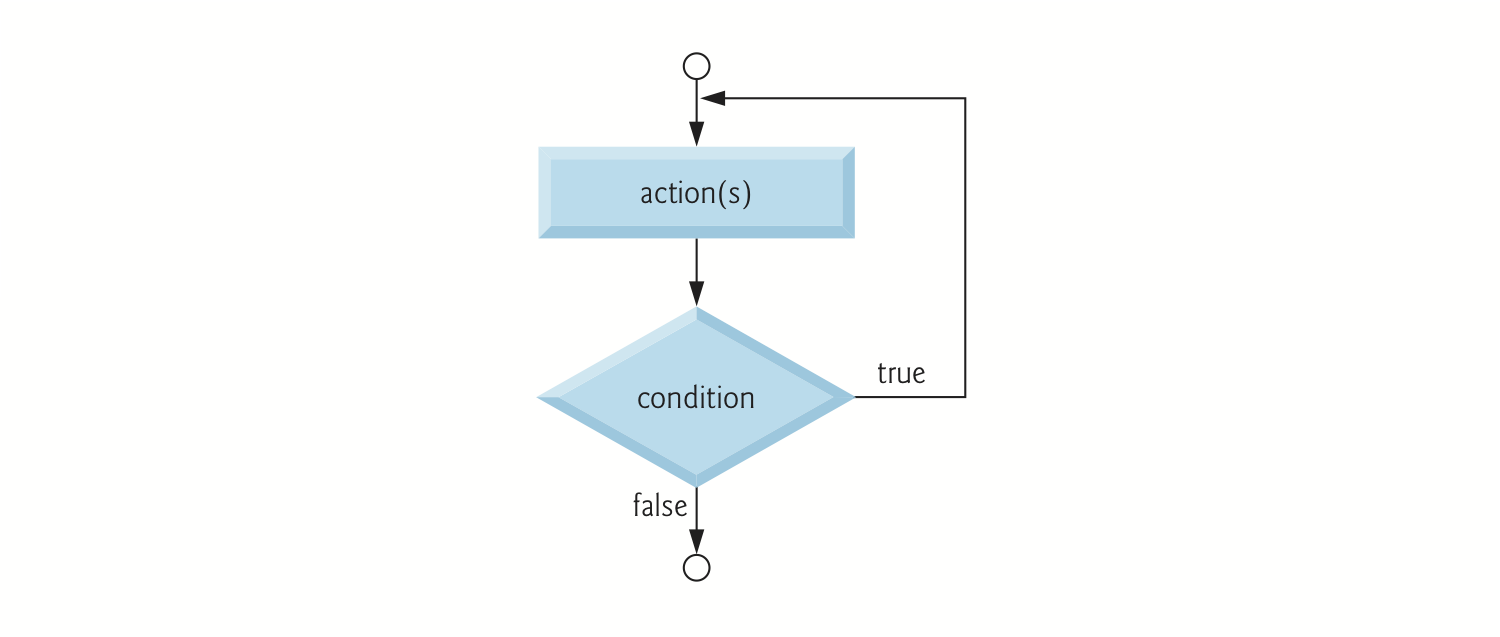
If there is no code in the suite that causes the while loop to end, then the code with run forever. The example code will run forever.
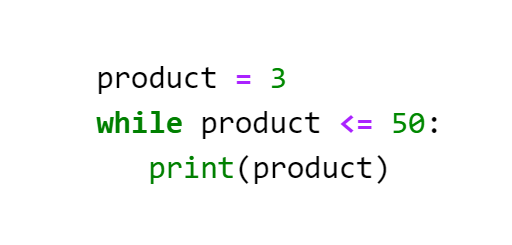
for Statement The for statement lets us repeat a suite for each item in a sequence of items. A string is a sequence of individual characters.
for character in 'Programming':
    print(character, end='  ')
P r o g r a m m i n g Upon entering the for loop, Python assigns the ‘P’ in ‘Programming’ to the target variable between keywords for and in.
After executing the suite, Python assigns to character the next item in the sequence (that is, the ‘r’ in ‘Programming’), then executes the suite again.
This continues while there are more items in the sequence.
Using the target variable in the suite is common but not required.
for Statement Flowchart 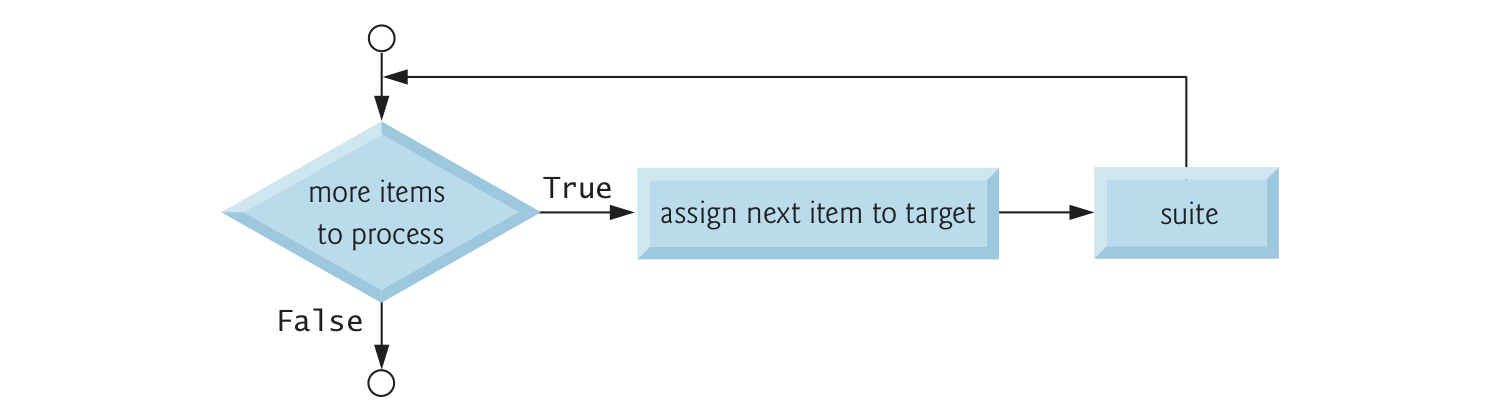
print’s end Keyword Argument print displays its argument(s), then moves the cursor to the next line.
Can change this behavior with the argument end: >python print(character, end=' ')
end is a keyword argument, but it’s not a Python keyword.
The Style Guide for Python Code recommends placing no spaces around a keyword argument’s =.
Keyword arguments are sometimes called named arguments.
print’s sep Keyword Argument sep (short for separator) specifies the string that appears between the items that print displays.print(10, 20, 30, sep=', ')10, 20, 30The sequence to the right of the for statement’s in keyword must be an iterable. This is an object from which the for statement can take one item at a time.
The following are examples of objects in Python that are iterable:
The in keyword used in for loops turns an iterable object into an iterator object behind the scenes. The mechanics of iterators are beyond the scope this bootcamp. For now, let’s simply look at how to iterate through a list.
total = 0for number in [2, -3, 0, 17, 9]:
total = total + numbertotal25range Function and Generators The range() function creates an iterable object that represents a sequence of consecutive integer values starting from 0 and continuing up to, but not including, the argument value.
for counter in range(10):
    print(counter, end=' ')
0 1 2 3 4 5 6 7 8 9 If two arguments are provided, then the created iterable object will be a sequence of consecutive integer values starting from the first argument and continuing up to, but not including, the second argument value.
for counter in range(5,10):
    print(counter, end=' ')
5 6 7 8 9 If three arguments are provided, then the created iterable object will be a sequence of consecutive integer values starting from the first argument and continuing up to, but not including, the second argument value, in steps equal to the third argument value.
for counter in range(0, 10, 2):
    print(counter, end=' ')
0 2 4 6 8 If a third argument is negative and the first argument is greater than the second argument, then the created iterable object will be a sequence of consecutive integer values starting from the first argument and descending down to, but not including, the second argument value, in steps equal to the third argument value.
for counter in range(10, 0, -1):
    print(counter, end=' ')
10 9 8 7 6 5 4 3 2 1 A Logical Error known as an off-by-one error occurs when you assume that range’s argument value is included in the generated sequence.
Selection and Iterative Statements can also be used within a suite. Notice that nested suites have to be indented beyond the current suite. This code will print A four times but each time after printing A, it will print B three times, then it will print a new line, using the empty print() statement.
for outer in range(4):      # outer loop
    print("A", end=' ')
    for inner in range(3):  # inner loop
        print("B", end=' ')
    print()
A B B B
A B B B
A B B B
A B B B If a nested suite is not properly indented, then an error will be raised.
for outer in range(4):
    print("A", end=' ')
    for inner in range(3):
    print("B", end=' ')   # nested suite is not properly indented
File "<ipython-input-36-99924b51f313>", line 4 print("B", end=' ') # nested suite is not properly indented ^ IndentationError: expected an indented block
Selection statements can also be used in suites. This code iterates through the values ranging from 0 up to but not including 10, and prints all of the even values.
for counter in range(10):
    if counter%2 == 0:           # If the remainder when dividing by 2 is equal to 0, then the number is equal
        print(counter, end=' ')
0 2 4 6 8 break and continue Statements Executing a break statement in a while or for will cause the code to immediately exit the statement.
for number in range(100):
    if number == 10:       # if the number is 10, then end the for loop
        break
    print(number, end=' ')
0 1 2 3 4 5 6 7 8 9 Executing a continue statement in a while or for loop skips the remainder of the loop’s suite. * In a while, the condition is then tested to determine whether the loop should continue executing. * In a for, the loop processes the next item in the sequence (if any)
for number in range(10):
    if number == 5:        # if the number is 5, then the suite stops being exceuted for this iteration
        continue
    print(number, end=' ')
0 1 2 3 4 6 7 8 9 and, or and not and Rather than using a nested if statement to ensure two conditions are both True, you can accomplish the same task with the Boolean and operator.
gender = 'Female'age = 70if gender == 'Female' and age >= 65:
print('Senior female')Senior femaleand operator:| expression1 | expression2 | expression1 AND expression2 |
|---|---|---|
False |
False |
False |
False |
True |
False |
True |
False |
False |
True |
True |
True |
or Rather than using a nested if statement to ensure at least one condition is True, you can accomplish the same task with the Boolean or operator.
semester_average = 83final_exam = 95if semester_average >= 90 or final_exam >= 90:
print('Student gets an A')Student gets an Aor operator:| expression1 | expression2 | expression1 OR expression2 |
|---|---|---|
False |
False |
False |
False |
True |
True |
True |
False |
True |
True |
True |
True |
not The Boolean not operator allows for Python to interpret the reverse of a Boolean value.
grade = 87if not grade == -1: # if the grade is NOT equal to -1
print('The next grade is', grade)The next grade is 87In many cases, the not operator is identical to the != operator
if grade != -1:  # if the grade doesn't equal -1a
    print('The next grade is', grade)
The next grade is 87not operator.| expression | NOT expression |
|---|---|
False |
True |
True |
False |
This next section will cover another form of control flow with Functions, which are repeatable suites of code that can perform any number of tasks whenever the function is called.
def Keyword The def keyword is used to create a function. The name of the function follows the def keyword and is then followed by parentheses and a colon.
def MyFunctionName():
    print("Hello World")
The name of the function is restricted to the standard naming restrictions for variables. As a reminder:
The code that is defined within a function is also a suite. This means that these suites must follow the standard indentation rules.
def MyFunctionName():
    print("Hello World")
If the suite is not properly indented, then an error will be raised.
def MyFunctionName():
print("Hello World")
File "<ipython-input-51-35375cecf438>", line 2 print("Hello World") ^ IndentationError: expected an indented block
It is also required that multiple statements in the function suite must have the same indentation.
def MyFunctionName():
    print("Hello World")
   print("How are you?")
File "<tokenize>", line 3 print("How are you?") ^ IndentationError: unindent does not match any outer indentation level
Calling functions in Python is easy. After the function has been declared, it can be called by the function name followed by parentheses.
def MyFunctionName():
print("Hello World")MyFunctionName()Hello WorldVariables and information can be passed into functions as arguments, which are also called parameters. All arguments are specified after the function name, inside the parentheses. When a function with an argument is called, the argument name becomes a variable inside the function and can be manipulated as if it were declared outside of a function.
def MyFunctionName(myArg):  # function with one argument
print(myArg)MyFunctionName("Hello World")Hello WorldMyFunctionName(23)23Arguments in a function become a part of the function’s namespace. After the code in the function in the code finishes executing, the function ends and all variable names in the function are discarded.
def MyFunctionName(myArg):  # myArg is defined inside the function's namespace
print(myArg)MyFunctionName("Hello World")
print(myArg) # myArg only defined inside the function, not outsideHello World--------------------------------------------------------------------------- NameError Traceback (most recent call last) <ipython-input-60-2e134ebd02cd> in <module> 1 MyFunctionName("Hello World") ----> 2 print(myArg) # myArg only defined inside the function, not outside NameError: name 'myArg' is not defined
Variables in a function’s namespace do not interfere with identically named variables outside of a function’s namespace.
def Addition(x):
    x = x + 5
    print("x inside the function:", x)
x = 3 # x declared outside of function
Addition(x) # x also declared inside of function
print("x outside the function:", x) # x declared outside of function is unaffectedx inside the function: 8
x outside the function: 3Local Variables can also be created within a function’s namespace without being an argument. These variables can only be accessed inside the function and will be discarded after the function finishes executing.
def Subtraction(x):
    LocalVar = x - 3     # LocalVar declared as a variable locally inside the function's namespace
    print(x,"- 3 =", LocalVar)
myNum = 7
Subtraction(myNum) # the value of nyNum gets assigned to x inside the function's namespace
print(LocalVar) # LocalVar only defined inside the function's namespace7 - 3 = 4--------------------------------------------------------------------------- NameError Traceback (most recent call last) <ipython-input-64-c701fd5f069a> in <module> 1 myNum = 7 2 Subtraction(myNum) # the value of nyNum gets assigned to x inside the function's namespace ----> 3 print(LocalVar) # LocalVar only defined inside the function's namespace NameError: name 'LocalVar' is not defined
Many arguments can be added to a function declaration. Each argument is separated by a comma.
def MakeFullName(first, last):  # function with 2 arguments
    full = first + " " + last
print(full)MakeFullName("Jane", "Doe")Jane DoeFunction arguments are order sensitive
MakeFullName("Doe", "Jane")Doe JaneIf not enough or too many arguments are passed into a function, then an error will be raised
MakeFullName("Jane") # too few arguments--------------------------------------------------------------------------- TypeError Traceback (most recent call last) <ipython-input-68-ee9efef7566d> in <module> ----> 1 MakeFullName("Jane") # too few arguments TypeError: MakeFullName() missing 1 required positional argument: 'last'
MakeFullName("Jane", "Doe", "Smith") # too many arguments--------------------------------------------------------------------------- TypeError Traceback (most recent call last) <ipython-input-69-699278aca28e> in <module> ----> 1 MakeFullName("Jane", "Doe", "Smith") # too many arguments TypeError: MakeFullName() takes 2 positional arguments but 3 were given
Not all arguments of a function have to be explicitly declared. Default arguments allow a user to choose in a function call whether or not to declare a specific argument of the function. If the argument, is not provided, the default argument that is created in the function declaration is used as the argument.
def Greeting(name, prefix = "Mr."):              # prefix is a default argument
print("Greetings, " + prefix + " " + name)Greeting("Thomas") # prefix argument is not declared, default is usedGreetings, Mr. ThomasThe default argument can still be called by explicitly declaring the argument in the function call.
Greeting("Mary", prefix= "Mrs.") # prefix argument is providedGreetings, Mrs. MaryA function may have any number of default arguments but all default arguments must be the last arguments to include in the function declaration. If a non-defualt argument occurs after a default argument in a function declaration, then an error will arise.
def Greeting(name, prefix = "Mr.", myArg):      # myArg is declared after a default argument
    print("Greetings " + prefix + " " + name)
File "<ipython-input-73-36375073daeb>", line 1 def Greeting(name, prefix = "Mr.", myArg): # myArg is declared after a default argument ^ SyntaxError: non-default argument follows default argument
Nearly all Python objects can be passed into functions as arguments. For example, lists can be passed into functions as an argument.
def PrintLoop(x):
    for element in x:             # iterate through x
        print(element, end = ' ') # print each element of x
myList = [1,2,3,4,5] # create a list
PrintLoop(myList) # In the function, x gets assigned myList1 2 3 4 5 Variables and information can be returned from functions.
return Keyword The return keyword is used in a function to return a single object. In this example, a number is passed into the function as an argument and multiplied by three. That value is then returned from the function. Any return statement will end the function and no more code in the function suite will be executed.
def Multiply(x):
    x = x * 3
    return x                  # return the value of x
    print("This won't run")   # Function ends after a return statement has been executed
y = Multiply(12) #return 12 * 3, then assign it to y
print(y)36Sometimes, it is desired to return more than one piece of information. However, only a single object can be returned by a function. If multiple variables, separated by a comma, are returned, Python will pack these variables into a tuple.
def MultiplyAndCube(x):
    y = x * 3
    z = x **3
    return y,z   # return the value of y and z in a tuple
myReturn = MultiplyAndCube(2)
print(myReturn)
# we can use unpacking to extract the values from this tuple
(m,c) = myReturn
print(m)
print(c)(6, 8)
6
8A function’s namespace is part of a larger topic of scope, which is serendipitously outside the scope of this bootcamp. For now, the global keyword will suffice as an introduction. Declaring a variable as global instructs Python to look outside the current namespace for the value assigned to that variable.
def Addition():
    global x     # tell python to look outside the functions namespace for a variable named x
    x = x + 5
Changes to a global variable will affect a variable that is outside the namespace of a function. Only variables within a function’s namespace are discarded after a successful execution.
x = 4       # delcare x outside the namespace of the Addtion function
Addition()  # Function searches for a variable named x
print(x) # x was updated9Lists and other mutable objects like dictionaries and sets don’t follow the same scoping rules that other variables do. While the reason for this is too complex for this bootcamp, it is best practice to assume that any list, dictionary, or set passed as an argument in a function is automatically considered a global variable.
def myFunction(aList):
    aList.append(10)     # changes to a list in a function affect the list outside the function's namespace
myList = [1,2,3,4] # create a list
myFunction(myList) # call function with list as an argument
print(myList) # myList is affected by changes in function[1, 2, 3, 4, 10]Input and Output Handling (i.e. I/O Handling), is an essential part of any programming language.
It allows the code to communicate and interact with the outside world, whether that be a human, or another file.
In Python, whenever we use print() the text is written to Python’s sys.stdout, whenever input() is used, it comes from sys.stdin
Whenever exceptions (errors) occur, information is written to sys.stderr.
Often it is useful to redirect the output of our code to a file, rather than stdout.
source: https://www.geeksforgeeks.org/how-to-print-to-stderr-and-stdout-in-python/
Python has several functions for creating, reading, updating, and deleting files.
The key function for working with files in Python is the open() function.
The open function is part of “base python” and does not require any extra package imports (more on this next week).
The open() function takes two parameters; filename, and mode.
There are four different modes for opening a file:
In addition you can specify if the file should be handled as binary or text mode
source: https://www.w3schools.com/python/python_file_handling.asp
print("READ ENTIRE FILE INTO A STRING")
f = open("./example-1.txt", 'r')
print(f.read())
READ ENTIRE FILE INTO A STRING
Desmond has a barrow in the market place,
Molly is the singer in a band.
Obladi, Oblada, life goes on, bra,
Lala how their life goes on.Notice that once the entire file is read, we need to reopen it, if we want to read it again. For example, the following line has no effect.
Since we’ve already read the entire file in the previous cell
print(f.read())Can also read just part of the file by specifying the number of characters to read
print("\nREAD ONLY THE FIRST N=10 CHARACTERS")
f = open("./example-1.txt", 'r')
print(f.read(10))
READ ONLY THE FIRST N=10 CHARACTERS
Desmond ha
We can read line by line using the file object’s readline() method
f = open("./example-1.txt", 'r')

#READ LINE-1
print(f.readline())

#READ LINE-2
print(f.readline())
Desmond has a barrow in the market place,
Molly is the singer in a band.
Or iterate over the lines in the file
f = open("./example-1.txt", 'r')
for line in f:
    print(line)
Desmond has a barrow in the market place,
Molly is the singer in a band.
Obladi, Oblada, life goes on, bra,
Lala how their life goes on.Note: You should always close your files, in some cases, due to buffering, changes made to a file may not show until you close the file.
f = open("./example-1.txt", 'r')
print(f.read())
f.close()
Desmond has a barrow in the market place,
Molly is the singer in a band.
Obladi, Oblada, life goes on, bra,
Lala how their life goes on.Best practice: use “with”
The best way to close a file is by using the with statement.
This ensures that the file is closed when the block inside the with statement is done.
We don’t need to explicitly call the close() method. It is done internally.
The standard syntax is the following
with open(“test.txt”, encoding = ‘utf-8’) as f: perform file operations
https://www.programiz.com/python-programming/file-operation
with open("./example-1.txt", 'r') as f:
    print(f.read())

#THIS IS EQUIVALENT TO
# f = open("./example-1.txt", 'r')
# print(f.read())
# f.close()
Desmond has a barrow in the market place,
Molly is the singer in a band.
Obladi, Oblada, life goes on, bra,
Lala how their life goes on.To write to an existing file, you must add a parameter to the open() function:
“a” - Append - will append to the end of the file
“w” - Write - will overwrite any existing content
print("WARNING: THE FOLLOWING WILL OVERWRITE THE FILE, DELETING THE OLD CONTENT!!! THIS CANT BE UN-DONE\n")

with open("example-2.txt", "w") as f:
    f.write("   Welcome to DSAN\n")

#NOTICE: THE LAST TWO LINES ARE EQUIVALENT TO
# f = open("./example-2.txt", 'w')
# f.write("   Welcome to DSAN\n")
# f.close()
WARNING: THE FOLLOWING WILL OVERWRITE THE FILE, DELETING THE OLD CONTENT!!! THIS CANT BE UN-DONE
#READ AND PRINT THE NEW FILE
with open("./example-2.txt", 'r') as f:
    print(f.read())
Welcome to DSAN
#"APPEND THE FILE WITH MORE TEXT (i.e. ADD TEXT INSTEAD OF OVERWRITING)\n"

with open("example-2.txt", "a") as f:
    f.write("       I'm adding some more text")
#"READ AND PRINT THE FILE AGAIN\n "
with open("./example-2.txt", 'r') as f:
print(f.read()) Welcome to DSAN
I'm adding some more textDisclaimer: This document is not an original work. It contains content from many sources and is for educational purposes only.
Sources: