Chapter 2 Tutorial
1. Paths
Let’s start with a very simple, undirected network.
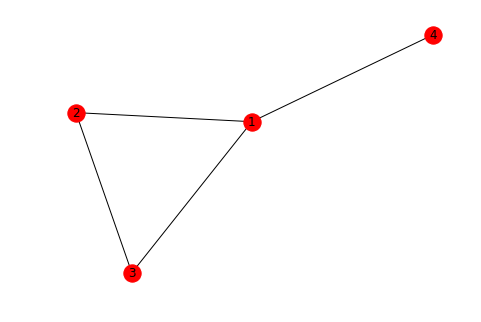
A path in a network is a sequence of edges connecting two nodes. In this simple example, we can easily see that there is indeed at least one path that connects nodes 3 and 4. We can verify this with NetworkX:
There can be more than one path between two nodes. Again considering nodes 3 and 4, there are two such “simple” paths:
A simple path is one without any cycles. If we allowed cycles, there would be infinitely many paths because one could always just go around the cycle as many times as desired.
We are often most interested in shortest paths. In an unweighted network, the shortest path is the one with the fewest edges. We can see that of the two simple paths between nodes 3 and 4, one is shorter than the other. We can get this shortest path with a single NetworkX function:
If you only care about the path length, there’s a function for that too:
Note that a path length is defined here by the number of edges in the path, not the number of nodes, which implies
nx.shortest_path_length(G, u, v) == len(nx.shortest_path(G, u, v)) - 1for nodes \(u\) and \(v\).
2. Connected components
In the simple network above, we can see that for every pair of nodes, we can find a path connecting them. This is the definition of a connected graph. We can check this property for a given graph:
Not every graph is connected:
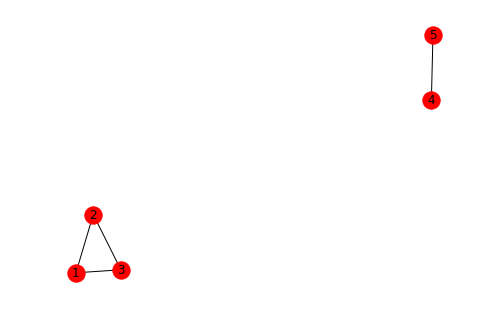
And NetworkX will raise an error if you ask for a path between nodes where none exists:
---------------------------------------------------------------------------
NetworkXNoPath                            Traceback (most recent call last)
<ipython-input-11-16717b9c7a13> in <module>()
----> 1 nx.shortest_path(G, 3, 5)

~/anaconda3/lib/python3.6/site-packages/networkx/algorithms/shortest_paths/generic.py in shortest_path(G, source, target, weight)
    140             # Find shortest source-target path.
    141             if weight is None:
--> 142                 paths = nx.bidirectional_shortest_path(G, source, target)
    143             else:
    144                 paths = nx.dijkstra_path(G, source, target, weight)

~/anaconda3/lib/python3.6/site-packages/networkx/algorithms/shortest_paths/unweighted.py in bidirectional_shortest_path(G, source, target)
    224
    225     # call helper to do the real work
--> 226     results = _bidirectional_pred_succ(G, source, target)
    227     pred, succ, w = results
    228

~/anaconda3/lib/python3.6/site-packages/networkx/algorithms/shortest_paths/unweighted.py in _bidirectional_pred_succ(G, source, target)
    292                         return pred, succ, w
    293
--> 294     raise nx.NetworkXNoPath("No path between %s and %s." % (source, target))
    295
    296

NetworkXNoPath: No path between 3 and 5.
Visually, we can identify two connected components in our graph. Let’s verify this:
The nx.connected_components() function takes a graph and returns a list of sets of node names, one such set for each connected component. Verify that the two sets in the following list correspond to the two connected components in the drawing of the graph above:
In case you’re not familiar with Python sets, they are collections of items without duplicates. These are useful for collecting node names because node names should be unique. As with other collections, we can get the number of items in a set with the len function:
We often care about the largest connected component, which is sometimes referred to as the core of the network. We can make use of Python’s builtin max function in order to obtain the largest connected component. By default, Python’s max function sorts things in lexicographic (i.e. alphabetical) order, which is not helpful here. We want the maximum connected component when sorted in order of their sizes, so we pass len as a key function:
While it’s often enough to just have the list of node names, sometimes we need the actual subgraph consisting of the largest connected component. One way to get this is to pass the list of node names to the G.subgraph() function:
Code
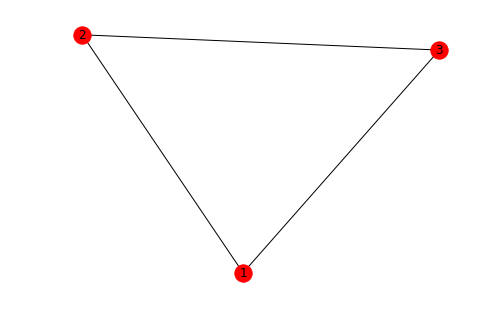
Those of you using tab-completion will also notice a nx.connected_component_subgraphs() function. This can also be used to get the core subgraph but the method shown is more efficient when you only care about the largest connected component.
3. Directed paths & components
Let’s extend these ideas about paths and connected components to directed graphs.
Directed paths
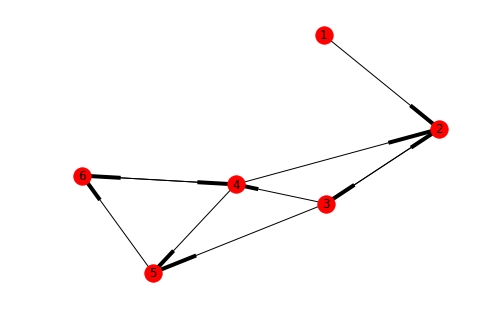
We know that in a directed graph, an edge from an arbitrary node \(u\) to an arbitrary node \(v\) does not imply that an edge exists from \(v\) to \(u\). Since paths must follow edge direction in directed graphs, the same asymmetry applies for paths. Observe that this graph has a path from 1 to 4, but not in the reverse direction.
The other NetworkX functions dealing with paths take this asymmetry into account as well:
Since there is no edge from 5 to 3, the shortest path from 5 to 2 cannot simply backtrack the shortest path from 2 to 5 – it has to go a longer route through nodes 6 and 4.
Directed components
Directed networks have two kinds of connectivity. Strongly connected means that there exists a directed path between every pair of nodes, i.e., that from any node we can get to any other node while following edge directionality. Think of cars on a network of one-way streets: they can’t drive against the flow of traffic.
Weakly connected means that there exist a path between every pair of nodes, regardless of direction. Think about pedestrians on a network of one-way streets: they walk on the sidewalks so they don’t care about the direction of traffic.
If a network is strongly connected, it is also weakly connected. The converse is not always true, as seen in this example.
The is_connected function for undirected graphs will raise an error when given a directed graph.
---------------------------------------------------------------------------
NetworkXNotImplemented                    Traceback (most recent call last)
<ipython-input-24-f36d0ff7b7e8> in <module>()
      1 # This will raise an error
----> 2 nx.is_connected(D)

<decorator-gen-208> in is_connected(G)

~/anaconda3/lib/python3.6/site-packages/networkx/utils/decorators.py in _not_implemented_for(f, *args, **kwargs)
     66         if match:
     67             raise nx.NetworkXNotImplemented('not implemented for %s type' %
---> 68                                             ' '.join(graph_types))
     69         else:
     70             return f(*args, **kwargs)

NetworkXNotImplemented: not implemented for directed type
In the directed case, instead of nx.connected_components we now have nx.weakly_connected_components and nx.strongly_connected_components: