Local LLM instances

Easiest Ways to Run an LLM Locally

1. Ollama — Easiest Overall

  • One-line install; one command to run a model
  • Automatically handles downloads, quantization, GPU use
  • Supports Llama 3, Mistral, Phi-3, Gemma, Qwen, etc.
  • Ideal for quick local chat or simple app integration

2. Hugging Face + Transformers (More Flexible)

  • Python-based, highly customizable
  • Suitable for research, fine-tuning, pipelines
  • More setup effort; not the simplest path

3. LM Studio — Easiest GUI

  • Full graphical interface
  • Built-in model browser and GPU detection
  • Works like a local ChatGPT client
  • Great for users who prefer a no-CLI workflow

Recommendation

Start with Ollama for the quickest, most reliable local setup. Works on macOS, Linux, and Windows (via WSL) with minimal configuration.

Model selection

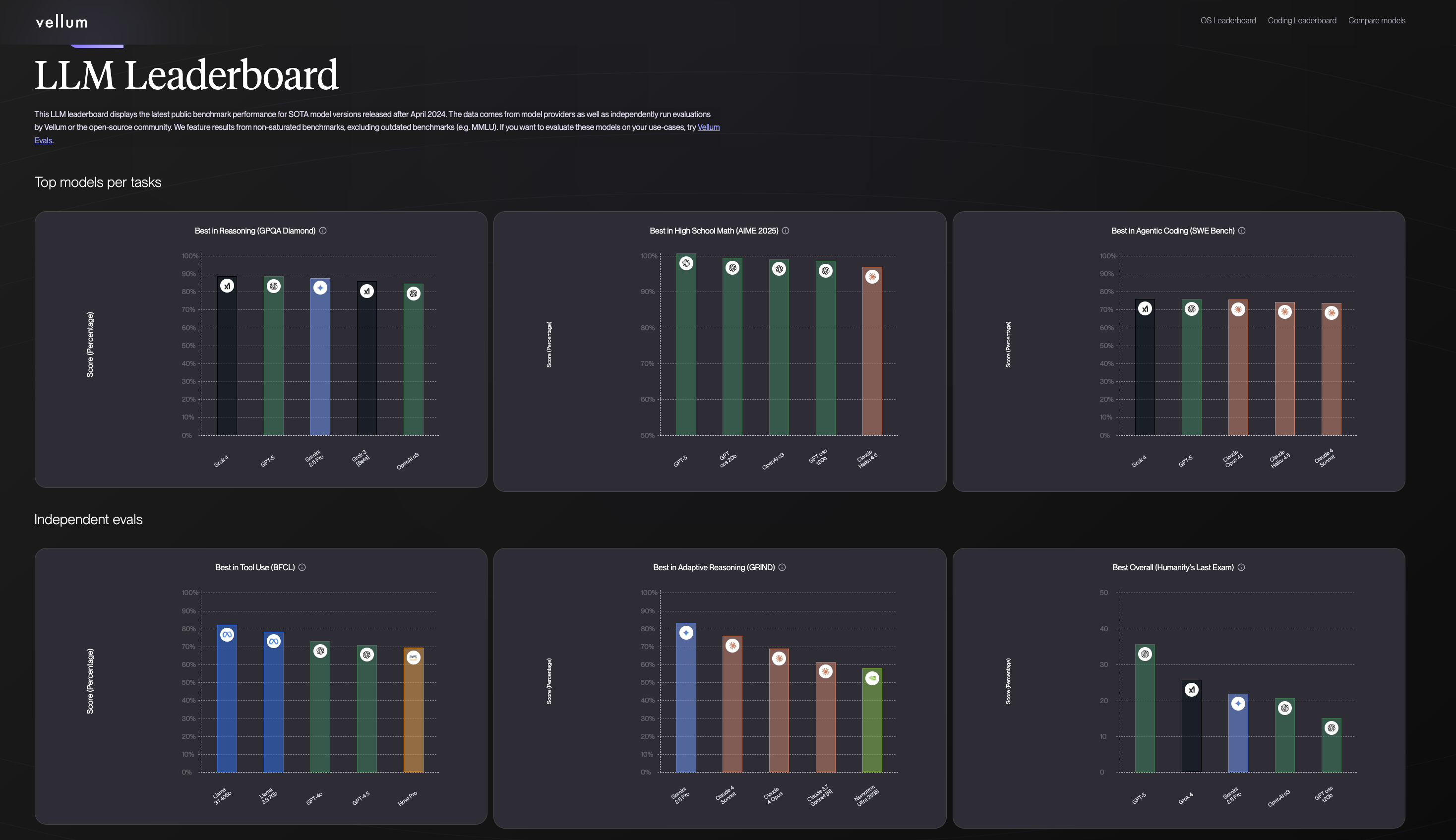
Model comparisons

  • some resources:
    • https://www.vellum.ai/llm-leaderboard?utm_source=google&utm_medium=organic
    • https://artificialanalysis.ai/leaderboards/models

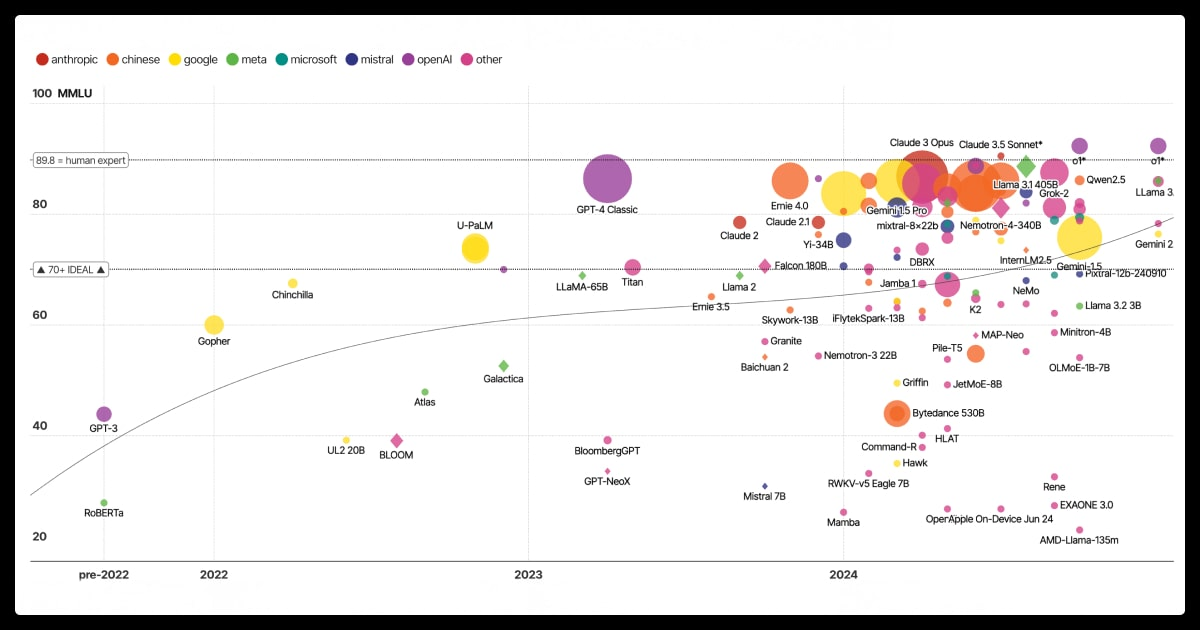
Size and performance vs time

https://labelyourdata.com/articles/llm-fine-tuning/llm-model-size

LLaMA Model Family

LLaMA (LLaMA → LLaMA 2 → LLaMA 3) is Meta’s family of open-source LLMs designed for high-quality general-purpose reasoning, chat, and coding across a range of sizes.

Key Features

  • Strong performance across reasoning, coding, and general language tasks
  • Efficient architectures (GQA, RoPE, optimized attention)
  • Instruction-tuned versions (“Instruct”/Chat) for safer conversational use
  • Broad range of model sizes and open licensing

Model Sizes

LLaMA 1: 7B, 13B, 33B, 65B LLaMA 2: 7B, 13B, 70B LLaMA 3 / 3.1: 8B, 70B, and other variants (large models still unreleased)

Variants

  • Chat / Instruct – aligned conversational versions
  • Coder – optimized for programming (community-trained)
  • MoE / Long-context – community variants with extended abilities

Strengths

  • High-quality reasoning and instruction following
  • Large ecosystem; widely adopted in research and industry
  • Fast inference and efficient scaling
  • Strong English performance

Weaknesses

  • Lacks native multimodal models (vision/audio via community add-ons)
  • Smaller models weaker in multilingual tasks
  • Large models require significant GPU resources

Qwen Model Family

Qwen (Qwen2 / Qwen2.5) is a family of open-source LLMs by Alibaba, designed for strong general-purpose and multilingual performance.

Key Features

  • Excellent reasoning, coding, and multilingual ability
  • Efficient architectures (FlashAttention, grouped-query attention)
  • Instruction-tuned “Instruct” versions for chat
  • Broad size range to fit any hardware

Model Sizes (Qwen2.5)

0.5B, 1.5B, 3B, 7B, 14B, 32B, 72B → Small to flagship-level capability.

Variants

  • Instruct – aligned chat models
  • Coder – programming-focused
  • VL – multimodal (vision + language)
  • Math – math reasoning
  • Audio – speech models

Strengths

  • Strong multilingual and coding performance
  • Highly efficient and fast
  • Great open-source ecosystem

Weaknesses

  • Large models depend on GPU kernel compatibility
  • Smaller sizes are weaker in purely English tasks

OLLAMA

Overveiw:

Ollama is a command-line tool that makes running large language models locally incredibly simple.

What is Ollama?

  • One-command setup: Download, install, and run LLMs with a single command
  • Automatic optimization: Handles model quantization and GPU acceleration automatically
  • Wide model support: Llama 3, Mistral, Phi-3, Gemma, CodeLlama, and many more
  • Cross-platform: Works on macOS, Linux, and Windows (via WSL)
  • API compatible: Provides OpenAI-compatible REST API for easy integration

How to Use Ollama:

  1. Install Ollama: bash curl -fsSL https://ollama.com/install.sh | sh ### Key Benefits:
  • Zero configuration - works out of the box
  • Automatic GPU detection and utilization
  • Model management - easy to download, update, and switch between models
  • Memory efficient - automatically manages model loading/unloading

Setup:

  • Install:
    • curl -fsSL https://ollama.com/install.sh | sh
  • Initialize the server: ollama serve
  • Pull a model: ollama pull qwen2.5:7b
  • Run a model: ollama run qwen2.5

Check resourse:

ollama ps

NAME              ID              SIZE      PROCESSOR    CONTEXT    UNTIL              
qwen2.5:latest    845dbda0ea48    5.6 GB    100% GPU     4096       4 minutes from now 

Method-1: Running Qwen-2.5 in terminal

(base) jh2343@dsan-server:~/running-and-LLM-locally$ ollama run qwen2.5
>>> in 30 words summarize the field of density functional theory 
Density functional theory (DFT) is a quantum mechanical theoretical method used in physics and 
chemistry to investigate the electronic structure of many-body systems, especially atoms, 
molecules, and the condensed phases.

Exiting:

Just use /bye to exit the conversation.

(base) jh2343@dsan-server:~/running-and-LLM-locally$ ollama run qwen2.5
>>> hey
Hello! How can I assist you today?

>>> /bye

Method-1: Running llama-3 in terminal

(base) jh2343@dsan-server:~/running-and-LLM-locally$ ollama pull llama3:8b
pulling manifest 
pulling 6a0746a1ec1a: 100% ▕██████████████████████▏ 4.7 GB                         
pulling 4fa551d4f938: 100% ▕██████████████████████▏  12 KB                         
pulling 8ab4849b038c: 100% ▕██████████████████████▏  254 B                         
pulling 577073ffcc6c: 100% ▕██████████████████████▏  110 B                         
pulling 3f8eb4da87fa: 100% ▕██████████████████████▏  485 B                         
verifying sha256 digest 
writing manifest 
success 

Note: these are stored in ~/.ollama/models

  • Start: ollama run llama3

  • Run: ollama run llama3 "Explain transformers in simple terms.

Local model storage

Note: these are stored in ~/.ollama/models

Typical sizes: Ollama 10B (Q4) → ~5–6 GB

(base) jh2343@dsan-server:~/running-and-LLM-locally$ du -csh  ~/.ollama/models/blobs/*
4.4G    /home/jh2343/.ollama/models/blobs/sha256-2bada8a7450677000f678be90653b85d364de7db25eb5ea54136ada5f3933730
4.0K    /home/jh2343/.ollama/models/blobs/sha256-2f15b3218f0552c60647ce60ada83632d2c09755b16259b13e3e4458e9ae419d
4.0K    /home/jh2343/.ollama/models/blobs/sha256-3f8eb4da87fa7a3c9da615036b0dc418d31fef2a30b115ff33562588b32c691d
16K     /home/jh2343/.ollama/models/blobs/sha256-4fa551d4f938f68b8c1e6afa9d28befb70e3f33f75d0753248d530364aeea40f
4.0K    /home/jh2343/.ollama/models/blobs/sha256-577073ffcc6ce95b9981eacc77d1039568639e5638e83044994560d9ef82ce1b
4.0K    /home/jh2343/.ollama/models/blobs/sha256-66b9ea09bd5b7099cbb4fc820f31b575c0366fa439b08245566692c6784e281e
4.4G    /home/jh2343/.ollama/models/blobs/sha256-6a0746a1ec1aef3e7ec53868f220ff6e389f6f8ef87a01d77c96807de94ca2aa
12K     /home/jh2343/.ollama/models/blobs/sha256-832dd9e00a68dd83b3c3fb9f5588dad7dcf337a0db50f7d9483f310cd292e92e
4.0K    /home/jh2343/.ollama/models/blobs/sha256-8ab4849b038cf0abc5b1c9b8ee1443dca6b93a045c2272180d985126eb40bf6f
4.0K    /home/jh2343/.ollama/models/blobs/sha256-eb4402837c7829a690fa845de4d7f3fd842c2adee476d5341da8a46ea9255175
8.8G    total

Method-2: Running in python (requests)

import requests
import json

resp = requests.post(
    "http://localhost:11434/api/generate",
    json={
        "model": "qwen2.5",
        "prompt": "Explain transformers in one sentence."
    },
    stream=True
)

for chunk in resp.iter_lines():
    if chunk:
        data = json.loads(chunk.decode())
        if 'response' in data:
            print(data['response'], end='')
Transformers are a type of neural network architecture that uses self-attention mechanisms to model sequence data more effectively, enabling significant advancements in tasks like machine translation and natural language understanding.

Method-3: Running in python (ollama package)

Need to install the ollama python client first

!python -m pip install ollama
Requirement already satisfied: ollama in ./miniforge3/lib/python3.12/site-packages (0.6.1)
Requirement already satisfied: httpx>=0.27 in ./miniforge3/lib/python3.12/site-packages (from ollama) (0.28.1)
Requirement already satisfied: pydantic>=2.9 in ./miniforge3/lib/python3.12/site-packages (from ollama) (2.12.5)
Requirement already satisfied: anyio in ./miniforge3/lib/python3.12/site-packages (from httpx>=0.27->ollama) (4.13.0)
Requirement already satisfied: certifi in ./miniforge3/lib/python3.12/site-packages (from httpx>=0.27->ollama) (2025.10.5)
Requirement already satisfied: httpcore==1.* in ./miniforge3/lib/python3.12/site-packages (from httpx>=0.27->ollama) (1.0.9)
Requirement already satisfied: idna in ./miniforge3/lib/python3.12/site-packages (from httpx>=0.27->ollama) (3.10)
Requirement already satisfied: h11>=0.16 in ./miniforge3/lib/python3.12/site-packages (from httpcore==1.*->httpx>=0.27->ollama) (0.16.0)
Requirement already satisfied: annotated-types>=0.6.0 in ./miniforge3/lib/python3.12/site-packages (from pydantic>=2.9->ollama) (0.7.0)
Requirement already satisfied: pydantic-core==2.41.5 in ./miniforge3/lib/python3.12/site-packages (from pydantic>=2.9->ollama) (2.41.5)
Requirement already satisfied: typing-extensions>=4.14.1 in ./miniforge3/lib/python3.12/site-packages (from pydantic>=2.9->ollama) (4.15.0)
Requirement already satisfied: typing-inspection>=0.4.2 in ./miniforge3/lib/python3.12/site-packages (from pydantic>=2.9->ollama) (0.4.2)

from ollama import Client

client = Client()

response = client.generate(
    model="qwen2.5",
    prompt="Concisely summarize the field of density functional theory in 30 words."
)

print(response["response"])
Density functional theory is a quantum mechanical theoretical framework used in physics and chemistry to investigate the electronic structure of many-body systems, especially atoms, molecules, and the condensed phases.

Hugging Face + Transformers

Overview:

Transformers is the standard Python library for:

  • Loading, running, and fine-tuning LLMs
  • Using pretrained models from the Hugging Face Hub
  • Running models locally on CPU, GPU, or with quantization

Strengths:

  • Huge model ecosystem
  • State-of-the-art implementations
  • Flexible (inference, training, fine-tuning, adapters)
  • Works with PyTorch, TensorFlow, and JAX

Typical workflow:

  1. Pick a model on Hugging Face
  2. Load tokenizer + model
  3. Run generation
  4. (Optional) Apply quantization or GPU acceleration

Setup

Note: bitsandbytes lets you run the model in 4-bit or 8-bit quantized mode, reducing VRAM usage.

!python -m pip install transformers accelerate bitsandbytes
Requirement already satisfied: transformers in ./miniforge3/lib/python3.12/site-packages (5.3.0)
Requirement already satisfied: accelerate in ./miniforge3/lib/python3.12/site-packages (1.13.0)
Requirement already satisfied: bitsandbytes in ./miniforge3/lib/python3.12/site-packages (0.49.2)
Requirement already satisfied: huggingface-hub<2.0,>=1.3.0 in ./miniforge3/lib/python3.12/site-packages (from transformers) (1.8.0)
Requirement already satisfied: numpy>=1.17 in ./miniforge3/lib/python3.12/site-packages (from transformers) (2.3.3)
Requirement already satisfied: packaging>=20.0 in ./miniforge3/lib/python3.12/site-packages (from transformers) (25.0)
Requirement already satisfied: pyyaml>=5.1 in ./miniforge3/lib/python3.12/site-packages (from transformers) (6.0.3)
Requirement already satisfied: regex!=2019.12.17 in ./miniforge3/lib/python3.12/site-packages (from transformers) (2026.2.28)
Requirement already satisfied: tokenizers<=0.23.0,>=0.22.0 in ./miniforge3/lib/python3.12/site-packages (from transformers) (0.22.2)
Requirement already satisfied: typer in ./miniforge3/lib/python3.12/site-packages (from transformers) (0.24.1)
Requirement already satisfied: safetensors>=0.4.3 in ./miniforge3/lib/python3.12/site-packages (from transformers) (0.7.0)
Requirement already satisfied: tqdm>=4.27 in ./miniforge3/lib/python3.12/site-packages (from transformers) (4.67.1)
Requirement already satisfied: filelock>=3.10.0 in ./miniforge3/lib/python3.12/site-packages (from huggingface-hub<2.0,>=1.3.0->transformers) (3.19.1)
Requirement already satisfied: fsspec>=2023.5.0 in ./miniforge3/lib/python3.12/site-packages (from huggingface-hub<2.0,>=1.3.0->transformers) (2025.9.0)
Requirement already satisfied: hf-xet<2.0.0,>=1.4.2 in ./miniforge3/lib/python3.12/site-packages (from huggingface-hub<2.0,>=1.3.0->transformers) (1.4.2)
Requirement already satisfied: httpx<1,>=0.23.0 in ./miniforge3/lib/python3.12/site-packages (from huggingface-hub<2.0,>=1.3.0->transformers) (0.28.1)
Requirement already satisfied: typing-extensions>=4.1.0 in ./miniforge3/lib/python3.12/site-packages (from huggingface-hub<2.0,>=1.3.0->transformers) (4.15.0)
Requirement already satisfied: anyio in ./miniforge3/lib/python3.12/site-packages (from httpx<1,>=0.23.0->huggingface-hub<2.0,>=1.3.0->transformers) (4.13.0)
Requirement already satisfied: certifi in ./miniforge3/lib/python3.12/site-packages (from httpx<1,>=0.23.0->huggingface-hub<2.0,>=1.3.0->transformers) (2025.10.5)
Requirement already satisfied: httpcore==1.* in ./miniforge3/lib/python3.12/site-packages (from httpx<1,>=0.23.0->huggingface-hub<2.0,>=1.3.0->transformers) (1.0.9)
Requirement already satisfied: idna in ./miniforge3/lib/python3.12/site-packages (from httpx<1,>=0.23.0->huggingface-hub<2.0,>=1.3.0->transformers) (3.10)
Requirement already satisfied: h11>=0.16 in ./miniforge3/lib/python3.12/site-packages (from httpcore==1.*->httpx<1,>=0.23.0->huggingface-hub<2.0,>=1.3.0->transformers) (0.16.0)
Requirement already satisfied: psutil in ./miniforge3/lib/python3.12/site-packages (from accelerate) (7.1.0)
Requirement already satisfied: torch>=2.0.0 in ./miniforge3/lib/python3.12/site-packages (from accelerate) (2.8.0)
Requirement already satisfied: setuptools in ./miniforge3/lib/python3.12/site-packages (from torch>=2.0.0->accelerate) (80.9.0)
Requirement already satisfied: sympy>=1.13.3 in ./miniforge3/lib/python3.12/site-packages (from torch>=2.0.0->accelerate) (1.14.0)
Requirement already satisfied: networkx in ./miniforge3/lib/python3.12/site-packages (from torch>=2.0.0->accelerate) (3.5)
Requirement already satisfied: jinja2 in ./miniforge3/lib/python3.12/site-packages (from torch>=2.0.0->accelerate) (3.1.6)
Requirement already satisfied: nvidia-cuda-nvrtc-cu12==12.8.93 in ./miniforge3/lib/python3.12/site-packages (from torch>=2.0.0->accelerate) (12.8.93)
Requirement already satisfied: nvidia-cuda-runtime-cu12==12.8.90 in ./miniforge3/lib/python3.12/site-packages (from torch>=2.0.0->accelerate) (12.8.90)
Requirement already satisfied: nvidia-cuda-cupti-cu12==12.8.90 in ./miniforge3/lib/python3.12/site-packages (from torch>=2.0.0->accelerate) (12.8.90)
Requirement already satisfied: nvidia-cudnn-cu12==9.10.2.21 in ./miniforge3/lib/python3.12/site-packages (from torch>=2.0.0->accelerate) (9.10.2.21)
Requirement already satisfied: nvidia-cublas-cu12==12.8.4.1 in ./miniforge3/lib/python3.12/site-packages (from torch>=2.0.0->accelerate) (12.8.4.1)
Requirement already satisfied: nvidia-cufft-cu12==11.3.3.83 in ./miniforge3/lib/python3.12/site-packages (from torch>=2.0.0->accelerate) (11.3.3.83)
Requirement already satisfied: nvidia-curand-cu12==10.3.9.90 in ./miniforge3/lib/python3.12/site-packages (from torch>=2.0.0->accelerate) (10.3.9.90)
Requirement already satisfied: nvidia-cusolver-cu12==11.7.3.90 in ./miniforge3/lib/python3.12/site-packages (from torch>=2.0.0->accelerate) (11.7.3.90)
Requirement already satisfied: nvidia-cusparse-cu12==12.5.8.93 in ./miniforge3/lib/python3.12/site-packages (from torch>=2.0.0->accelerate) (12.5.8.93)
Requirement already satisfied: nvidia-cusparselt-cu12==0.7.1 in ./miniforge3/lib/python3.12/site-packages (from torch>=2.0.0->accelerate) (0.7.1)
Requirement already satisfied: nvidia-nccl-cu12==2.27.3 in ./miniforge3/lib/python3.12/site-packages (from torch>=2.0.0->accelerate) (2.27.3)
Requirement already satisfied: nvidia-nvtx-cu12==12.8.90 in ./miniforge3/lib/python3.12/site-packages (from torch>=2.0.0->accelerate) (12.8.90)
Requirement already satisfied: nvidia-nvjitlink-cu12==12.8.93 in ./miniforge3/lib/python3.12/site-packages (from torch>=2.0.0->accelerate) (12.8.93)
Requirement already satisfied: nvidia-cufile-cu12==1.13.1.3 in ./miniforge3/lib/python3.12/site-packages (from torch>=2.0.0->accelerate) (1.13.1.3)
Requirement already satisfied: triton==3.4.0 in ./miniforge3/lib/python3.12/site-packages (from torch>=2.0.0->accelerate) (3.4.0)
Requirement already satisfied: mpmath<1.4,>=1.1.0 in ./miniforge3/lib/python3.12/site-packages (from sympy>=1.13.3->torch>=2.0.0->accelerate) (1.3.0)
Requirement already satisfied: MarkupSafe>=2.0 in ./miniforge3/lib/python3.12/site-packages (from jinja2->torch>=2.0.0->accelerate) (3.0.3)
Requirement already satisfied: click>=8.2.1 in ./miniforge3/lib/python3.12/site-packages (from typer->transformers) (8.3.1)
Requirement already satisfied: shellingham>=1.3.0 in ./miniforge3/lib/python3.12/site-packages (from typer->transformers) (1.5.4)
Requirement already satisfied: rich>=12.3.0 in ./miniforge3/lib/python3.12/site-packages (from typer->transformers) (14.3.3)
Requirement already satisfied: annotated-doc>=0.0.2 in ./miniforge3/lib/python3.12/site-packages (from typer->transformers) (0.0.4)
Requirement already satisfied: markdown-it-py>=2.2.0 in ./miniforge3/lib/python3.12/site-packages (from rich>=12.3.0->typer->transformers) (4.0.0)
Requirement already satisfied: pygments<3.0.0,>=2.13.0 in ./miniforge3/lib/python3.12/site-packages (from rich>=12.3.0->typer->transformers) (2.19.2)
Requirement already satisfied: mdurl~=0.1 in ./miniforge3/lib/python3.12/site-packages (from markdown-it-py>=2.2.0->rich>=12.3.0->typer->transformers) (0.1.2)
Model on CPU

import torch
from transformers import AutoTokenizer, AutoModelForCausalLM

model_name = "TinyLlama/TinyLlama-1.1B-Chat-v1.0"

tokenizer = AutoTokenizer.from_pretrained(model_name)
model = AutoModelForCausalLM.from_pretrained(
    model_name,
    torch_dtype=torch.float16,
    device_map="auto"
)

prompt = "Hello! Explain what a neural network is in one sentence."

print(model.hf_device_map)

inputs = tokenizer(prompt, return_tensors="pt").to(model.device)

with torch.no_grad():
    outputs = model.generate(
        **inputs,
        max_new_tokens=50
    )

print(tokenizer.decode(outputs[0], skip_special_tokens=True))

Model on GPU

import torch
from transformers import AutoTokenizer, AutoModelForCausalLM

model_name = "TinyLlama/TinyLlama-1.1B-Chat-v1.0"

# Make sure CUDA is available
assert torch.cuda.is_available(), "CUDA not available. Check your environment."

device = "cuda"

print("Using device:", device)

# -----------------------
# Load tokenizer
# -----------------------
tokenizer = AutoTokenizer.from_pretrained(model_name)

# -----------------------
# Load model and move to GPU
# -----------------------
model = AutoModelForCausalLM.from_pretrained(
    model_name,
    torch_dtype=torch.float16,
)

model = model.to(device)   # <-- explicit GPU placement

print("Model loaded on:", next(model.parameters()).device)

# -----------------------
# Run generation
# -----------------------
prompt = "Hello! Explain what a neural network is in one sentence."

inputs = tokenizer(prompt, return_tensors="pt").to(device)

with torch.no_grad():
    outputs = model.generate(
        **inputs,
        max_new_tokens=50,
        temperature=0.7
    )

print("\n--- Output ---\n")
print(tokenizer.decode(outputs[0], skip_special_tokens=True))
/home/jh2343/miniforge3/lib/python3.12/site-packages/tqdm/auto.py:21: TqdmWarning: IProgress not found. Please update jupyter and ipywidgets. See https://ipywidgets.readthedocs.io/en/stable/user_install.html
  from .autonotebook import tqdm as notebook_tqdm
Warning: You are sending unauthenticated requests to the HF Hub. Please set a HF_TOKEN to enable higher rate limits and faster downloads.
Using device: cuda
`torch_dtype` is deprecated! Use `dtype` instead!
Loading weights: 100%|██████████| 201/201 [00:00<00:00, 1804.33it/s]
/home/jh2343/miniforge3/lib/python3.12/site-packages/torch/cuda/__init__.py:829: UserWarning: Can't initialize NVML
  warnings.warn("Can't initialize NVML")
The following generation flags are not valid and may be ignored: ['temperature']. Set `TRANSFORMERS_VERBOSITY=info` for more details.
Both `max_new_tokens` (=50) and `max_length`(=2048) seem to have been set. `max_new_tokens` will take precedence. Please refer to the documentation for more information. (https://huggingface.co/docs/transformers/main/en/main_classes/text_generation)
Model loaded on: cuda:0

--- Output ---

Hello! Explain what a neural network is in one sentence. A neural network is a mathematical model that can be used to solve complex problems by combining the concepts of computation, signal processing, and artificial intelligence.