Google Colab

Overview

  • It is recommended that you have Keras, Tensorflow, and PyTorch running locally on your laptop
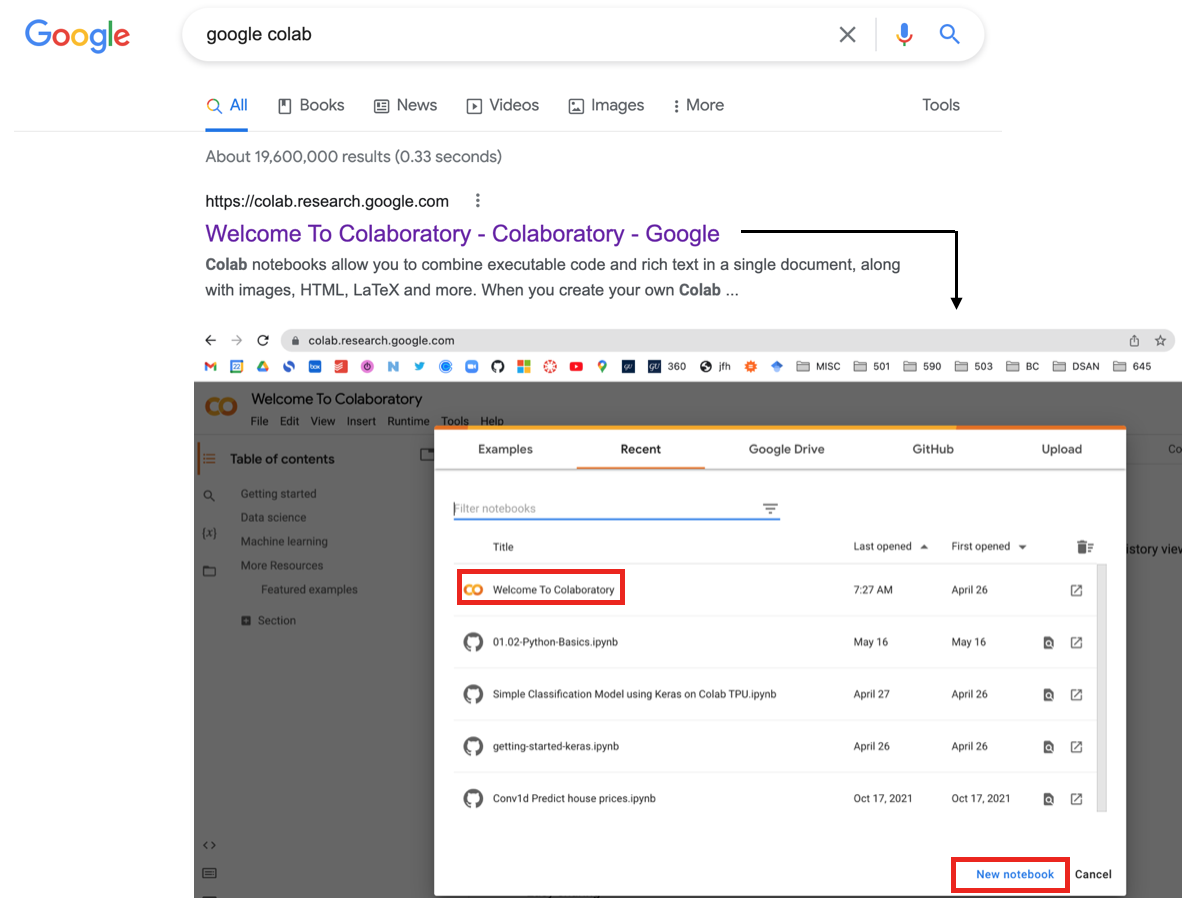
  • However, you could also run your code using cloud resources such as Google Colab
  • What is Google Colab?
    • Free cloud-based Jupyter notebook environment.
    • Offers GPU/TPU support for accelerated computation.
    • Allows collaborative coding and sharing.
    • Access to Google Drive integration.
    • Ideal for data analysis, machine learning, and research.
    • Pre-installed libraries and easy package installation.
    • Auto-saving and versioning of notebooks.
    • Supports markdown, code cells, and rich media.
    • Seamless integration with Google services.
    • Enables interactive coding, visualization, and experimentation.

NOTE: Many Google Co-Lab keyboard shortcuts are same as VS-code (e.g. command+/ is block comment)

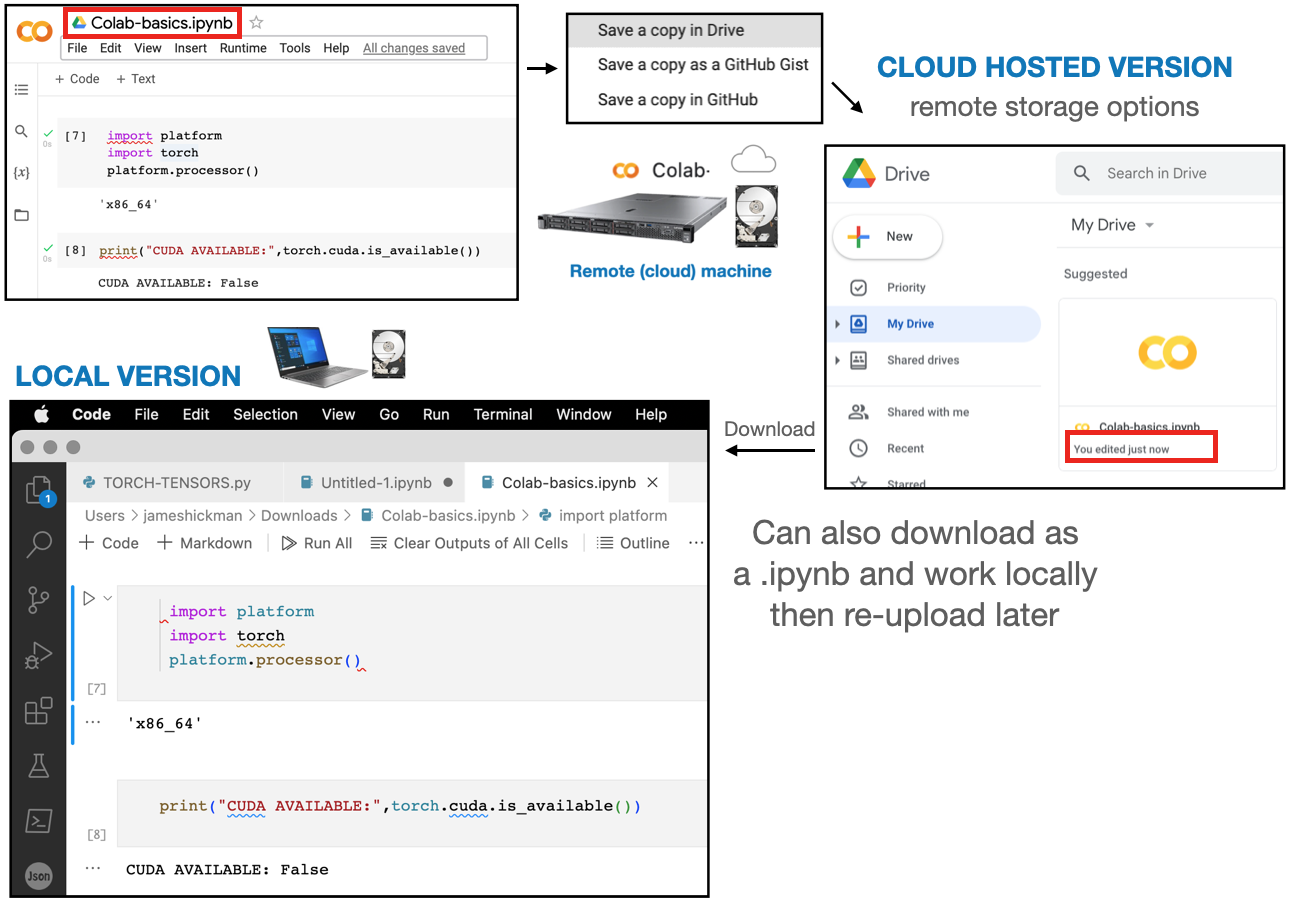
File storage: Downloading

  • By default the Co-Lab files are stored in the cloud on Google Drive servers
  • You can also download them to run them locally (Cloud storage \(\rightarrow\) local storage)

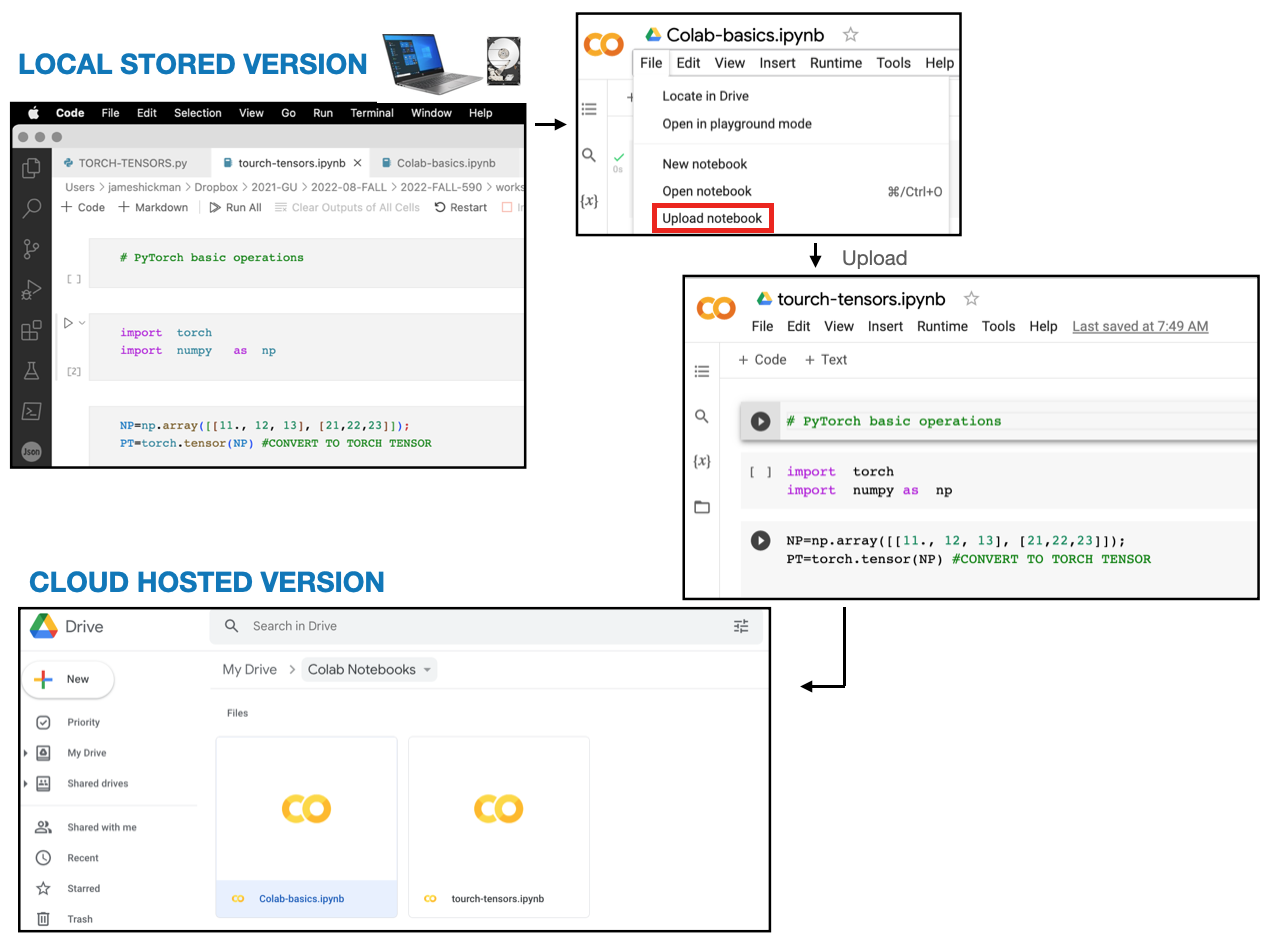
File storage: Uploading

  • You can also upload local files to run them in the cloud (Local storage \(\rightarrow\) Cloud storage)

Pre-installed libraries

  • One of the best aspects is the ease of use, due to pre-installed libraries
  • By running the following code we can see that all libraries are installed
# TENSORFLOW
import tensorflow as tf
print("TENSORFLOW VERSION:",tf.__version__)

# PYTORCH
import torch
print("PYTORCH VERSION:",torch.__version__)

# KERAS
import keras;
print("KERAS VERSION:",keras.__version__)
---------------------------------------------------------------------------
ModuleNotFoundError                       Traceback (most recent call last)
Cell In[1], line 2
      1 # TENSORFLOW
----> 2 import tensorflow as tf
      3 print("TENSORFLOW VERSION:",tf.__version__)
      5 # PYTORCH

ModuleNotFoundError: No module named 'tensorflow'

GPU and TPU access

  • GPU: Graphics Processing Unit, hardware for accelerated parallel processing, for computationally intensive deep learning tasks
  • TPU: Tensor Processing Unit, Google’s specialized hardware for efficient matrix computations, AI workflows, & faster training.
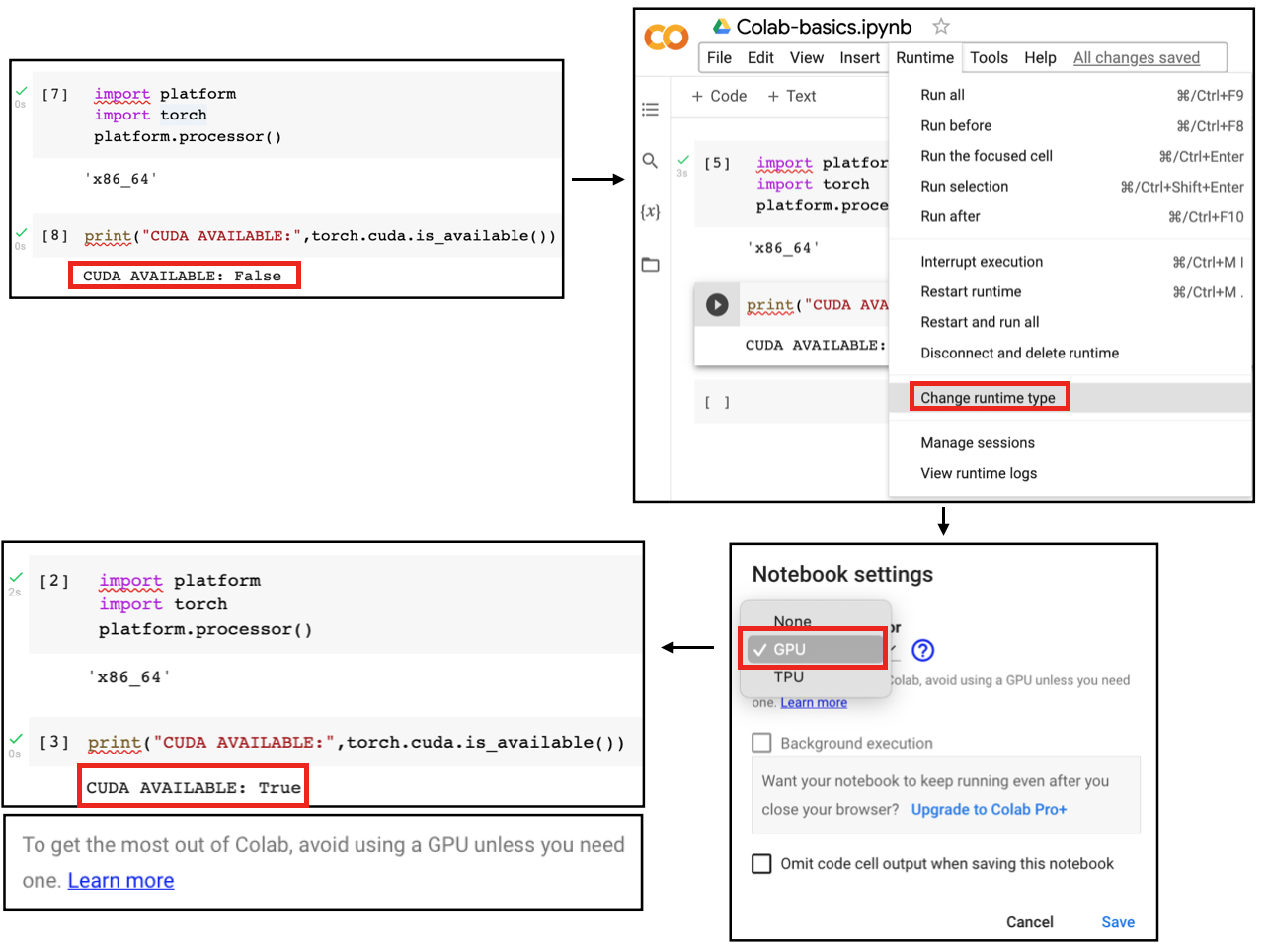
  • GPU/TPU support is available on Co-Lab for accelerated computation, using the following steps;

Exploring a computer’s resources

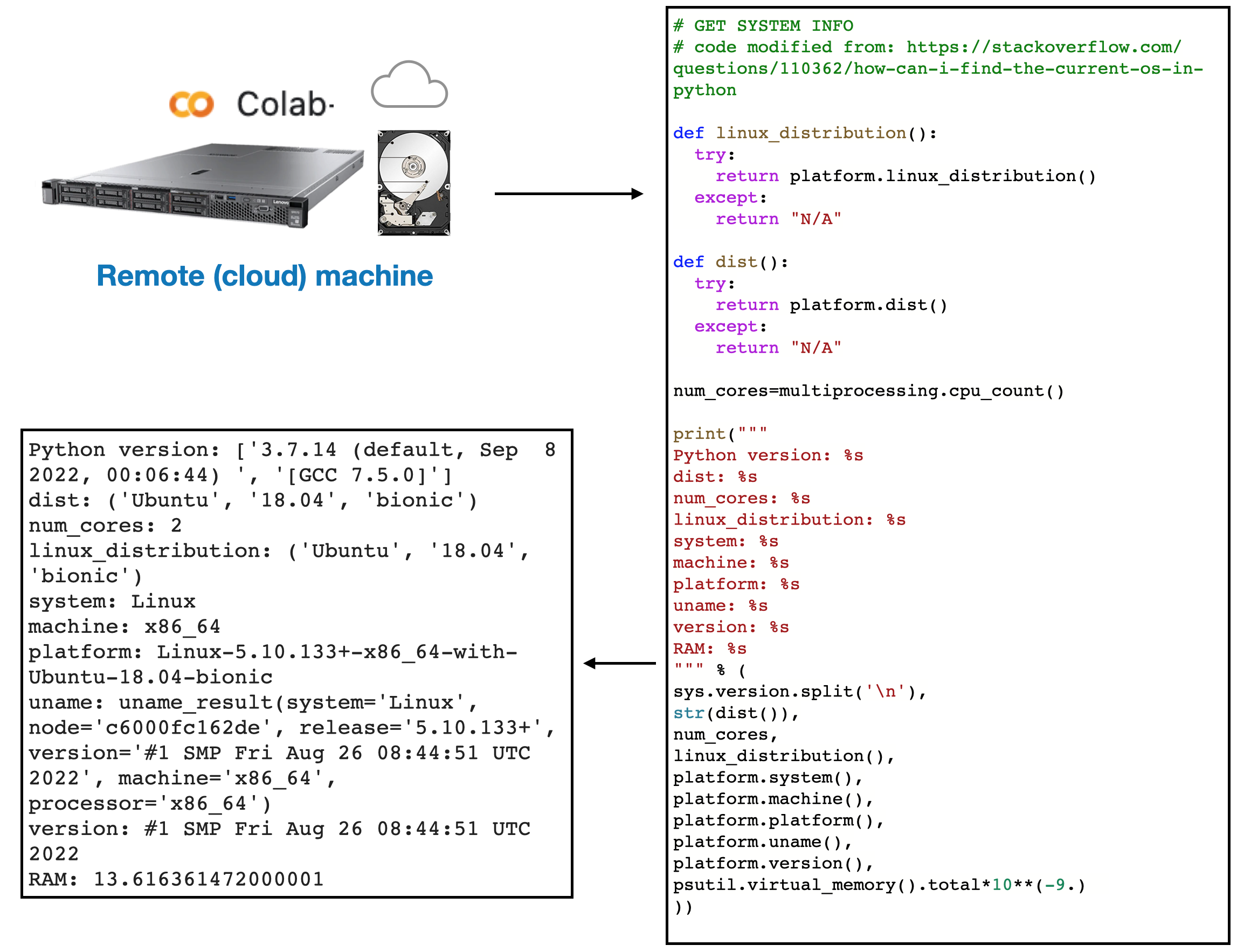
  • Following code can be run to interrogate a computers resources, it should work on any computer
# GET SYSTEM INFO
# code modified from: https://stackoverflow.com/questions/110362/how-can-i-find-the-current-os-in-python

import platform
import multiprocessing
import sys
import psutil

def linux_distribution():
  try:
    return platform.linux_distribution()
  except:
    return "N/A"

def dist():
  try:
    return platform.dist()
  except:
    return "N/A"

num_cores=multiprocessing.cpu_count()

print("""
Python version: %s
dist: %s
num_cores: %s
linux_distribution: %s
system: %s
machine: %s
platform: %s
uname: %s
version: %s
RAM: %s
""" % (
sys.version.split('\n'),
str(dist()),
num_cores,
linux_distribution(),
platform.system(),
platform.machine(),
platform.platform(),
platform.uname(),
platform.version(),
psutil.virtual_memory().total*10**(-9.)
))

# print('GPU name: ', tf.config.experimental.list_physical_devices('GPU'))

Python version: ['3.10.12 (main, Jun 11 2023, 05:26:28) [GCC 11.4.0]']
dist: N/A
num_cores: 2
linux_distribution: N/A
system: Linux
machine: x86_64
platform: Linux-5.15.109+-x86_64-with-glibc2.35
uname: uname_result(system='Linux', node='00ef615be315', release='5.15.109+', version='#1 SMP Fri Jun 9 10:57:30 UTC 2023', machine='x86_64')
version: #1 SMP Fri Jun 9 10:57:30 UTC 2023
RAM: 13.613305856

CPU: Co-Lab server resources

Running the code from the previous slide gives us a snapshot of the Co-Lab server’s computational resources

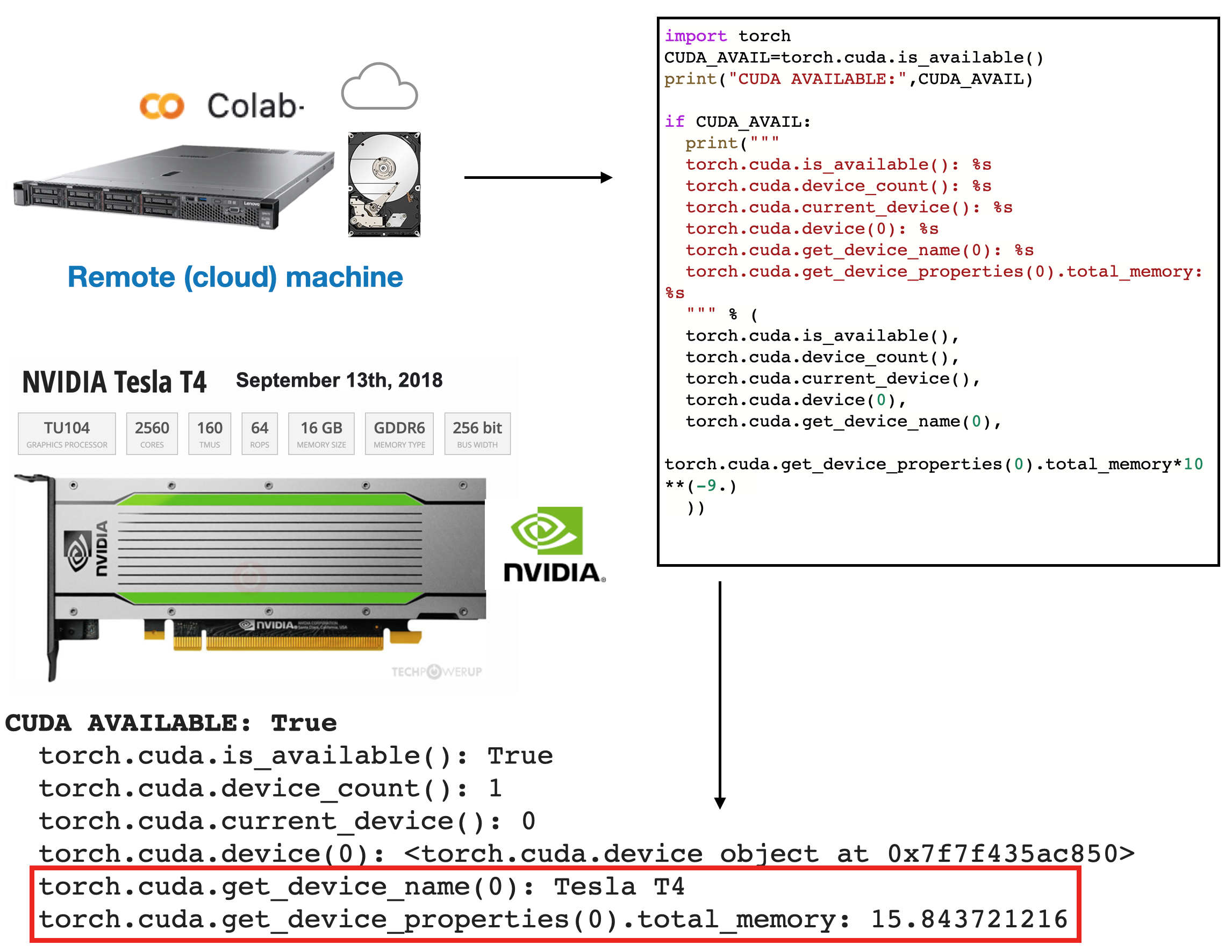
GPU: Co-Lab server resources

We can do the same after activating the GPU

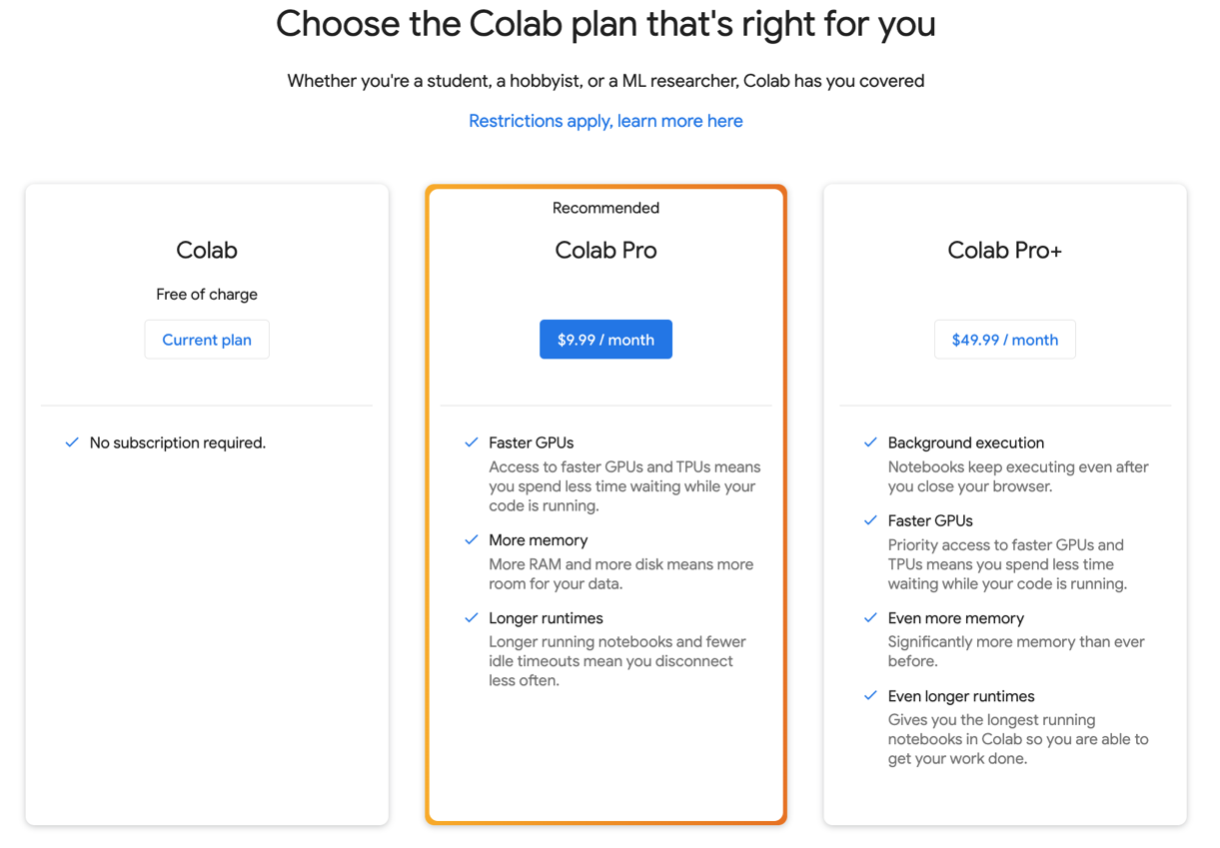
Up-grading resources (Optional)

  • Users who are interested in more reliable access & better resources can upgrade to Colab Pro.
  • This is not required for this course, but it is an option if you feel you need it

Limitations

  • Is it really free of charge to use?: Yes. Colab is free of charge to use.
  • Seems too good to be true. What are the limitations?
    • Colab resources are not guaranteed, not unlimited, & the usage limits sometimes fluctuate. This is necessary for Colab to be able to provide resources for free.
    • For more reliable access & better resources consider the paid version
    • Resources in Colab are prioritized for interactive use cases. We prohibit actions associated with bulk compute, actions that negatively impact others, as well as actions associated with bypassing our policies.
  • How long can notebooks run in Colab?: Notebooks run by connecting to virtual machines that have maximum lifetimes that can be as much as 12 hours.
  • What are the usage limits of Colab?: Colab provides resources free of charge by having dynamic usage limits that sometimes fluctuate, & by not providing guaranteed or unlimited resources. This means that overall usage limits as well as idle timeout periods, max VM lifetime, GPU types available, and other factors vary over time.